






You come out of a showing, get in the car, and pull up your MLS app to check the comparable two streets over while the buyer's comment about the kitchen is still fresh in your head. That's the moment this page is about: the apps you use all day, and what happens to what you heard.
The best apps for real estate agents, by tool family
MLS
Your MLS app is where the listings live: searching, comps, tax records, and the showing instructions everyone forgets to read. Many agents use their regional MLS's own app alongside RPR (Realtors Property Resource) or Cloud CMA for comps and buyer-ready reports.
Brokerage portal
The brokerage portal is where your files, compliance checklists, and company announcements sit, on platforms such as BoldTrail (formerly kvCORE) or Brokermint, depending on your brokerage. It works, it's just not where your memory lives.
Transactions
Transaction management apps like Dotloop, SkySlope and zipForm keep signatures, disclosures, and file checklists in order. Once a deal is under contract, these are the apps you live in.
Showings
Showing apps handle scheduling, lockbox access, and feedback requests: ShowingTime for scheduling and feedback, Supra eKEY and SentriLock for lockbox access. The feedback part matters most for follow-up, which is worth a look on its own: open house follow-up.
Lead portals
Portal apps such as Zillow Premier Agent, Realtor.com and Homes.com bring buyers in, usually with a form attached and a timer running. The leads are worth answering; the context around them is worth keeping.
CRM
Your CRM, whether that's Follow Up Boss, Lofty or BoldTrail, holds contacts, statuses, and the pipeline. Agents who search for a real estate CRM companion usually want the same thing: the CRM keeps the record, something else keeps the meaning.
Email and calendar
Inbox and calendar apps such as Gmail, Outlook and Google Calendar carry most of the day-to-day commitments: the 4 p.m. showing, the lender check-in, the offer deadline on Tuesday. The Librarian's follow-up reminders work alongside them so the promises in those threads don't quietly expire.
Prospecting
Prospecting apps such as Cole Realty Resource and REDX help you find and stay in touch with your sphere: past clients, farm areas, the people who said "call me in the spring." The best apps for realtors in this family are the ones you'll actually keep using, which is usually whichever one nags you least.
The gap between them
Here's the problem with a good stack of real estate apps for agents: each app records what it was built to record. The MLS knows what you searched. The CRM knows the client's stage. The showing app knows you were at the property.
What none of them hold is what the buyer said in the driveway: that they'd go to $415,000 for the right layout, that the schools are the real sticking point, that they're selling a condo in another state first. That conversation happened in your car, between appointments, and it lives nowhere. If you're wondering how to keep client details in one place, the answer is that many agents don't, and it costs them.
How it works
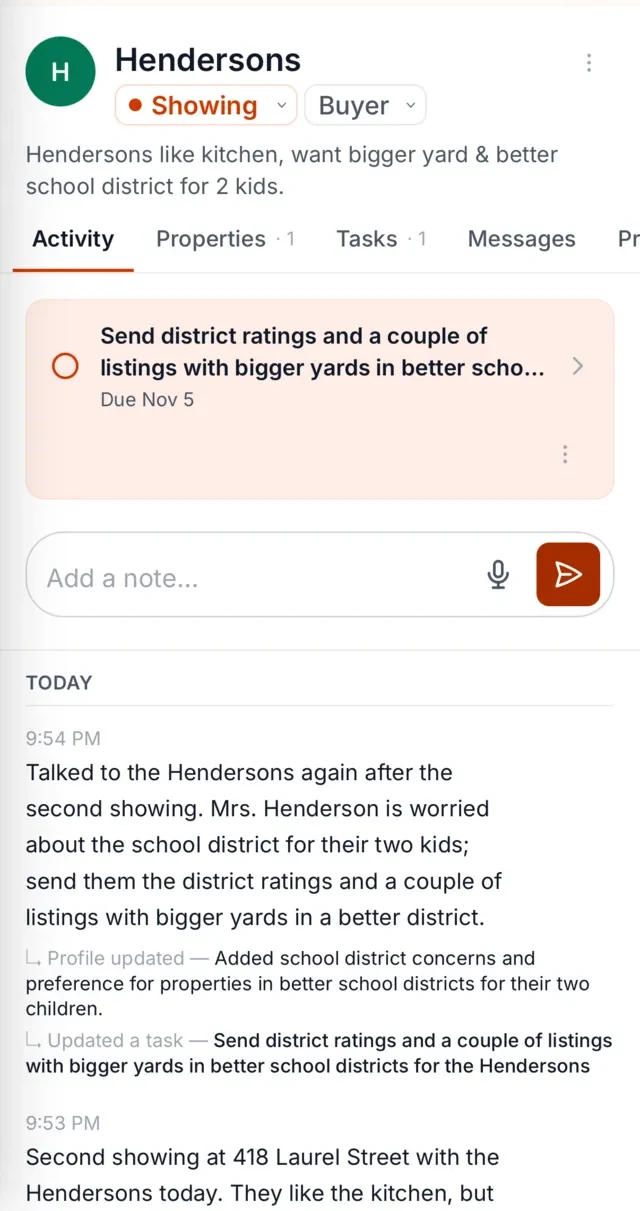
After a call or showing, you record a short voice note in The Librarian: what was said, what the client wants, what you promised.
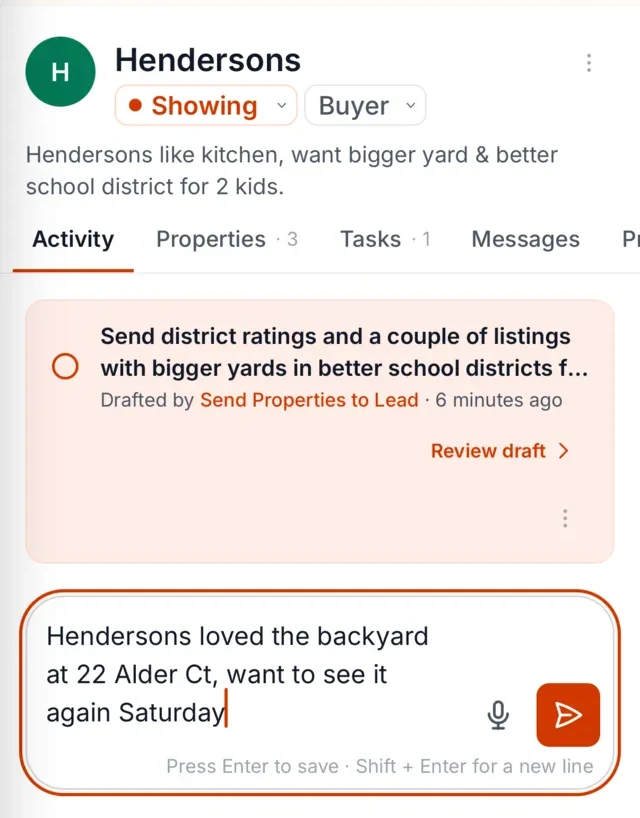
The Librarian keeps that note against the right client, so the budget change, the school question, and the timeline shift stay attached to the person who said them.
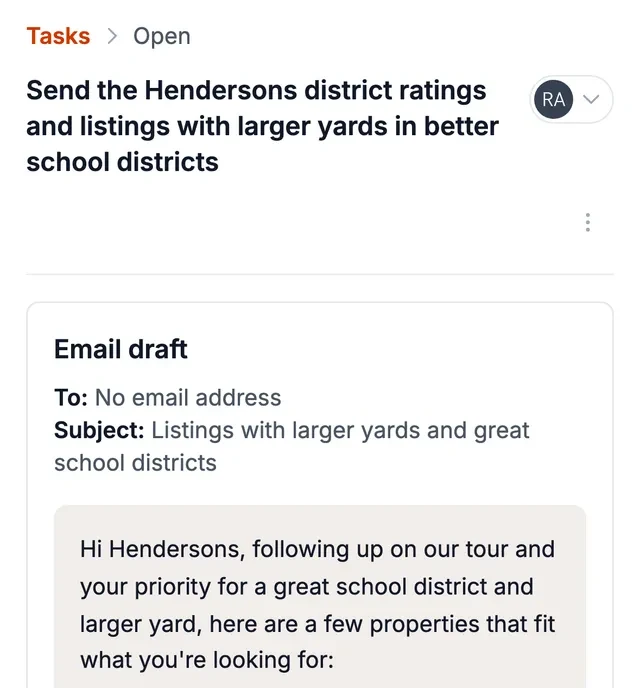
When it's time to follow up, you get a reminder and a drafted message you can edit and send. By default, you approve each message before it goes out.
The memory layer that sits on top of all of them
The Librarian connects directly to Gmail, Google Calendar, Google Contacts, BoldTrail CRM, WhatsApp and SMS, and works alongside the rest of the apps above.
The Librarian is built for exactly that gap. It works alongside your MLS, CRM, inbox and portals, and does one job well: it keeps what you heard attached to the right client, then brings it back when the follow-up is due.
You talk. The Librarian records the note, keeps it against the person it belongs to, reminds you who needs you, and drafts the follow-up so it's ready when you are. No second system to keep up to date. The apps above keep doing their jobs, and the conversations you have stop disappearing into them.
Works alongside your tools
It sits on top of the tools you already use and connects directly to BoldTrail CRM, Gmail, Google Calendar, Google Contacts, WhatsApp and SMS. Say what happened after a call or showing, and it does the remembering, the reminding, and the drafting. If your CRM is where the record lives, start with the CRM companion.
FAQ
What apps does a new agent need?
Start with your MLS app, a showing scheduler, a transaction platform once you have deals under contract, and an e-signature tool. Add lead and prospecting tools as your pipeline grows. A place to keep what clients tell you is worth having from the first conversation onward, which is where The Librarian fits.
Free vs paid apps?
Many MLS, showing, and e-signature apps are included through your brokerage or association. Standalone tools vary, and the paid ones are usually worth it when they save you an hour a week or a lost follow-up. The Librarian costs USD 49.99 a month after a 30-day free trial.
How many tools do agents use?
Agents typically use several in a normal week: MLS, showings, transactions, email and calendar, and a CRM. Fewer than that usually means something is being tracked in your head, which works until a busy month.
How do I keep client details in one place?
Pick one place for the notes that come out of conversations, and make it easy enough to use in the car between showings. The Librarian is built for that: you record what happened, it stays against the right client, and it comes back to you when the follow-up is due.