






The real moment usually happens in the car. You've just finished a showing, your buyer said something specific about the kitchen, and you have twelve minutes before the next appointment. You could type it into your phone while parked, or you could just say it out loud and let it get filed against the right person.
AI for real estate agents, one job at a time
Different jobs call for different tools. Here's how they sort out.
Listing descriptions. Writing listing copy is the most common use of AI tools for real estate agents. ChatGPT, Claude, and Gemini can all draft property descriptions from your bullet points. Give them the facts and the tone you want, and edit what comes back. The good ones read like a person wrote them, because a person did, just with a first draft done faster.
Photos and staging. AI photo editing tools can tidy listing photos: brightening, straightening verticals, sometimes removing things that shouldn't be in frame. Some agents also use virtual staging tools to furnish empty rooms. Use these with care; your MLS has rules about what's fair to alter, and buyers notice when the photos don't match the house.
Lead response. Speed matters when a new lead comes in. ChatGPT can help you write quick, non-robotic replies, and some teams use it to draft responses to common portal inquiries. The risk is sounding canned. A reply that references what the person actually asked beats a polished template every time.
Follow-up and memory. This is where things usually fall apart, and it's where a real estate AI assistant earns its keep. The problem isn't writing the follow-up; it's remembering that it needs to happen, and remembering what was said three weeks ago. A tool that holds onto those details and surfaces them at the right time does something ChatGPT in a blank chat window can't. We've written more about follow-up reminders for real estate agents and about voice notes for real estate agents if you want the full picture.
Showings. After a showing, the details pile up: what they liked, what they hated, what they want to see next. Getting those out of your head and into a system while they're fresh is the whole game. Say it into a voice note in the car between showings; sort it out later, or don't, if the tool does that for you.
Past clients. Referrals come from people who hear from you at the right moment. Anniversary of the purchase, a local market shift, a question they asked you once that got answered. Keeping track of those threads is unglamorous work that pays off years later. Some agents hand this to a real estate virtual assistant; the rest use software.
Admin. Transaction summaries, email drafting, meeting agendas, comparing contracts. ChatGPT for real estate agents mostly means this: a fast first draft of writing you were going to do anyway. It's the least exciting use, possibly the most valuable, and where most writing about AI for realtors starts.
Copy-paste ChatGPT prompts for agents
A few prompts that tend to produce usable first drafts. Swap in your own details.
Listing copy:
You're writing a listing description for a [property type] in [market]. Key facts: [beds, baths, square footage, notable features]. The likely buyer is [who]. Keep it under [length], avoid clichés, and write in a plain, confident tone.
Follow-up email:
Draft a short follow-up email to a buyer I showed [property type] to. Context: [what stood out to them, their concerns]. Next step: [what I want to propose]. Two or three sentences, warm but not gushing, no exclamation points.
Market update:
Write a short market update for past clients in [area]. Context to include: [inventory, average days on market, recent comparable sales]. Keep it factual, note that this isn't advice for their specific situation, and end with an invitation to reach out.
The usual caveats apply: check your MLS and board rules on what AI-generated marketing copy is allowed to say.
Where an AI assistant helps and where it doesn't
AI won't negotiate for you, won't build the relationship, and won't know which buyer is serious. Those are the parts of the job that make you an agent rather than a website. An AI assistant for real estate agents is only as good as what it knows about your clients.
What it does well is the surrounding work. Drafting, summarizing, remembering, reminding, taking the small tasks that each take a minute and together eat an afternoon. The best AI tools for real estate agents are the ones that quietly remove that work without demanding much in return.
A general-purpose chat is good for drafting. It is not good at remembering that a client mentioned something specific weeks ago, because a general chat tool wasn't built around your client list. That gap is the whole reason dedicated tools exist.
Where The Librarian fits
The Librarian is an AI real estate assistant focused on two of the jobs above: memory and follow-up. You talk, it files what matters against the right client, and it brings things back to you when someone needs to hear from you, with a draft ready.
It works alongside your MLS, CRM, inbox and portals and how you already work. You keep your tools; The Librarian adds a layer that pays attention to the details and commitments that fall between them.
If you're weighing options, we've put together a rundown of the best apps for real estate agents, including where The Librarian fits among them.
It connects directly to BoldTrail CRM, Gmail, Google Calendar, Google Contacts, WhatsApp and SMS. See how The Librarian sits on top of your CRM.
How it works
The workflow is three steps. The first two take about as long as the walk back to the car.
1. Say what happened. After a call, a showing, or an open house, open The Librarian and record a voice note. Talk like you're telling a colleague about your afternoon: who you saw, what they said, what they asked you to send.
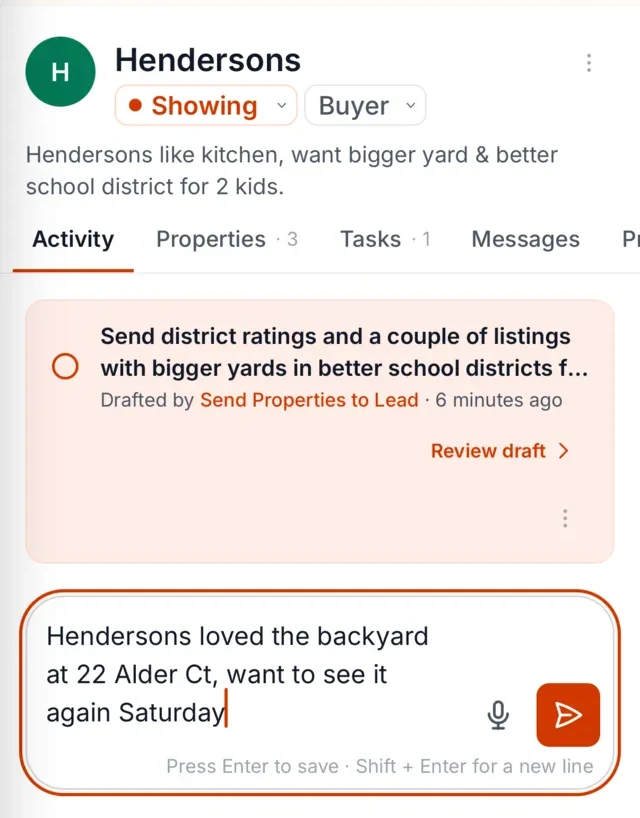
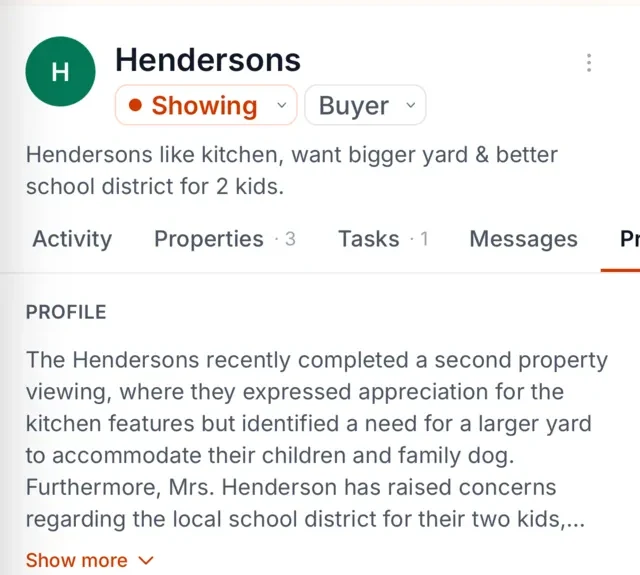
2. It lands on the right client. The Librarian listens, pulls out the details worth keeping, and files them against the right contact. The buyer's comment about wanting a bigger yard is now attached to the buyer, not lost in a voice memo you'll never replay.
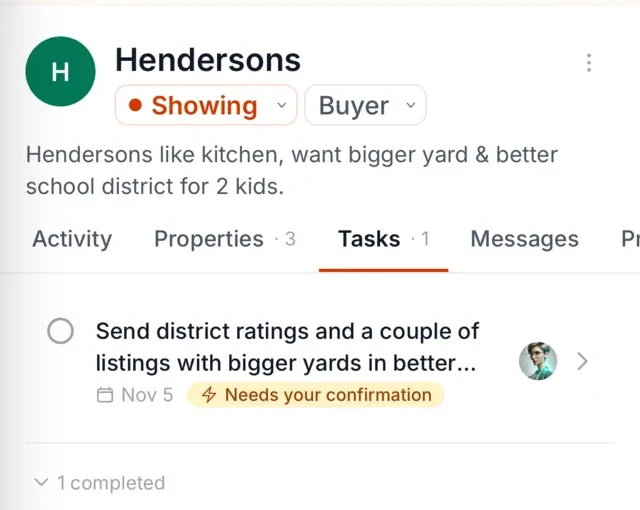
3. You get reminded, and the follow-up is drafted. When someone needs a reply, The Librarian brings it to your attention, along with a draft you can edit and send. By default, you approve each message before it goes out. You keep the relationship; the machinery runs underneath.
FAQ
Will AI replace real estate agents?
No. AI handles drafting and reminders, while the parts clients actually pay for, like judgment, negotiation, and knowing a neighborhood, stay with you. For a longer look, see our article on whether AI will replace real estate agents. (read it here)
Is ChatGPT safe for client information?
Depends on your settings and your state's rules. Consumer chat tools may use your inputs to train models unless you've turned that off, and some client details may be governed by your MLS or privacy laws. The safe default: don't paste confidential client information into any tool you haven't vetted, and check your board's guidance.
What AI do top agents use?
There's no survey we'd trust on this, so we won't invent one. In practice, agents use a mix: a general chat tool for drafting, something for listing photos, and an assistant that remembers client details and prompts the follow-up. The combination matters more than any single name.
Where should I start?
With the job that eats the most of your week and has the worst consequences when it's dropped. For most agents, that's follow-up and remembering what clients said, not listing copy. Try it against your own week; that tells you more than any guide.