






It usually starts the way most things do in this business: in the car, between appointments, thinking about the four people you promised to call back. One of them asked about the school district. One mentioned a lease ending in June, and there's one you simply can't forget to reach before the weekend.
How it works
Say what happened. After a showing or a call, speak a quick note. No typing, no forms. "Showed the Hendersons the Oak Street house. They loved the kitchen, worried about the yard for the dog, want to see something with a bigger lot this weekend."
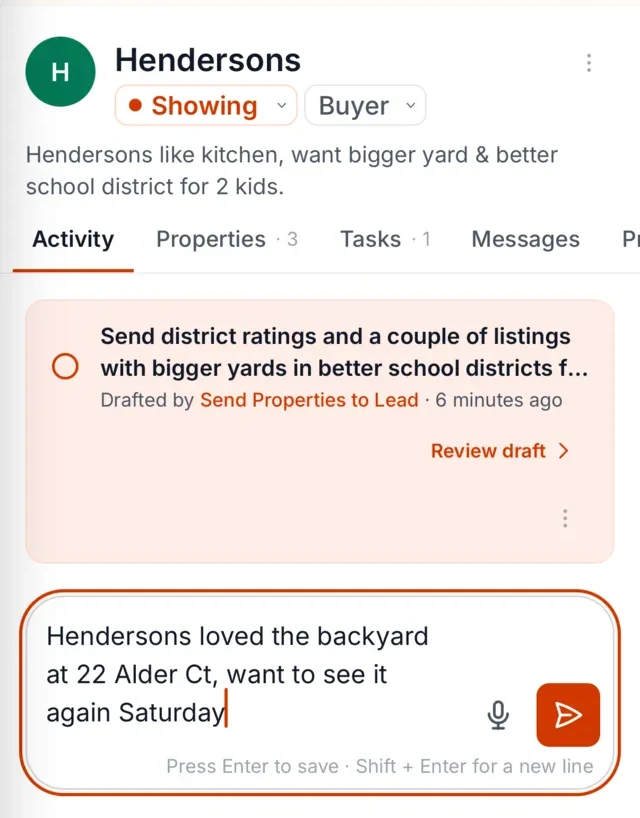
The Librarian remembers it against the right client. That note attaches itself to the Hendersons, not to a general inbox. It becomes part of what the system knows about them: what they've seen, what they've said, what they care about.
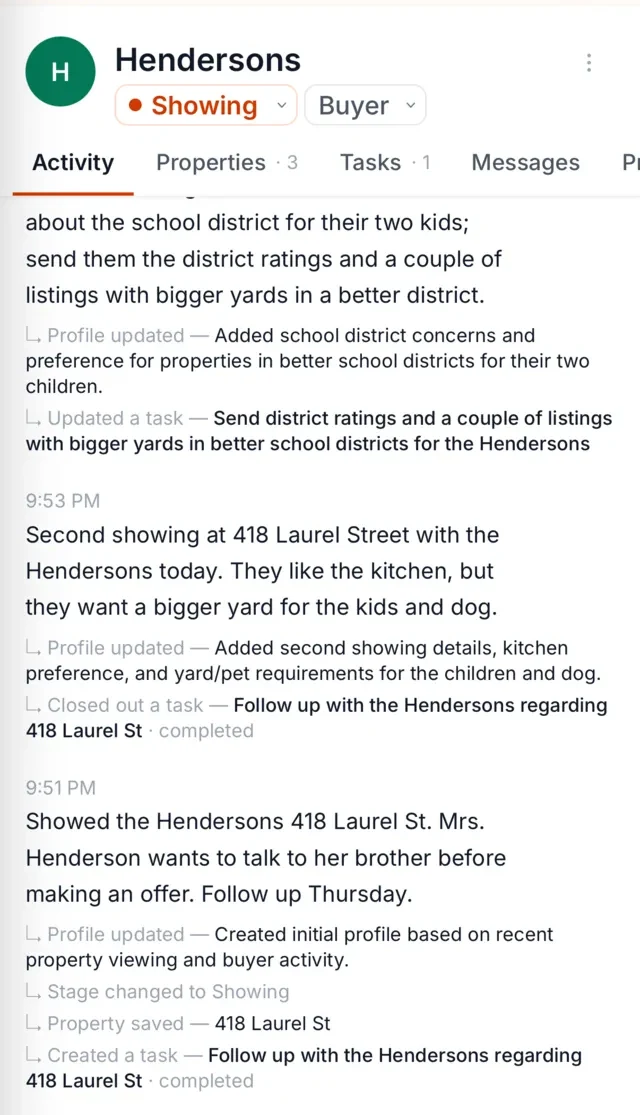
You get reminded, and the follow-up is drafted. When Saturday's plan is due, so is the reminder, along with a draft follow-up that mentions the yard, the lot, and the showing, ready for your review. By default, you approve each message before it goes out.
Where an agent's leads come from and why they scatter
A lead rarely arrives in one piece. It shows up as an email from a portal, a text at 9 p.m., a name scribbled on a sign-in sheet, a referral from a past client who heard you were good with first-time buyers. Each one lands somewhere different.
The portal email sits in your inbox and the text lives on your phone. The sign-in sheet is in your bag. The referral is in a voice mail you keep meaning to return. The information arrived in six places while you were between showings.
Real estate lead management usually fails at exactly this point: not at the moment of interest, but in the week after, when the details scatter and nobody's quite sure who was supposed to follow up.
Lead management for real estate agents, kept simple
Lead management tools can get elaborate fast. This doesn't need to. In The Librarian, each lead sits at one stage that describes what's actually true:
- New
- Qualified
- Viewing / Showing
- Offer
- Negotiation
- Under Contract
- Closed Won
- Closed Lost
- Nurture (Long-term): not now, but not never. The lease that ends in June. The couple saving for spring.
- Unqualified / Dead
A good real estate lead tracker doesn't ask you to sort people into fifteen fields. It asks you to know, at a glance, who's where, and what the next step is. If you've been wondering how to keep leads organized without turning it into a project, stages like these are most of it.
Capturing a lead by voice, or from the portal's lead email
Two moments matter most in nurturing a lead: the moment a lead arrives, and the moment you do something about it.
When a portal lead email from Zillow, Realtor.com or Homes.com lands in Gmail, The Librarian can read it, pull out who's asking and what they asked, and get it onto the right record, so it's a person with a question, not an email you'll find on Thursday.
And when a promising conversation happens between appointments, you speak it. Thirty seconds in the car, and the lead has a history instead of a timestamp. A drip campaign sends the same sequence to everyone; a note like this is what lets your next message be specific.
Who needs you today
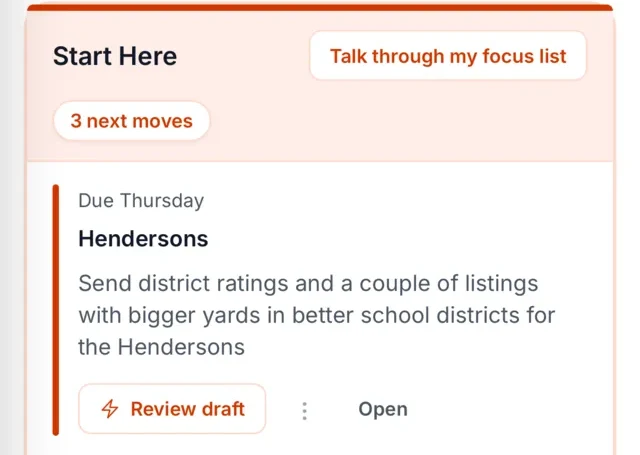
The part that matters day to day: a short daily list of who needs you. Not everyone. Not a dashboard of everything. A short list of the people whose next step has come due: the follow-up you promised, the reply you said you'd send by Friday, the client you asked it to remind you about.
If you want more on how the timing works, see follow-up reminders for real estate agents. The same loop that tracks showings, open house follow-up especially, is what keeps a Saturday sign-in sheet from becoming a stack of names nobody called.
Following a deal from first text to closing
A real estate deal tracker is really a memory problem. The first text is three months before the closing, and in between there's an inspection, a lender question, a concession discussion, and a moment where the buyer says something that changes everything, in a sentence you'd lose if you didn't say it out loud somewhere.
The Librarian's voice-note loop means the deal's history builds up as you go, one voice note at a time. What was said after the inspection is there, along with what the seller's agent mentioned about the roof and what your buyer was nervous about on Tuesday. It's a transaction record in the plain sense: the transaction's story, kept in order, attached to the right people. If you've been let down by pipeline tools that show you columns but can't tell you what happened in any of them, this is the difference.
Works alongside your tools
The Librarian works alongside the tools you already use (your MLS, CRM, inbox and portals) rather than asking you to move anything. You keep your systems; The Librarian adds the memory and the follow-through on top of them. It connects directly to BoldTrail CRM, Gmail, Google Calendar, Google Contacts, WhatsApp and SMS. See the leads tools page for how that works in practice.
FAQ
Is this a CRM?
No. It keeps lead stages and client memory, but it is not a CRM replacement: it sits on top of the CRM you already have and works alongside your MLS, inbox and portals. It adds memory, reminders, and drafted follow-ups on top of what's already there.
Can it read portal lead emails?
Yes, lead emails from Zillow, Realtor.com or Homes.com that arrive in Gmail, as described above. You can review it before you reply.
How do I bring my existing leads in?
Import them from a CSV file, your CRM or your contacts. After that, speak a note about each lead as it comes up, and portal leads arriving in Gmail land on a record by themselves. Your Google Contacts stay up to date too.
Is my data private?
Yes. Your notes, client records and drafts are not used to train models, and SOC 2 certification is in progress.