






Real estate follow-up templates by moment
Below are the moments agents follow up in most often. Each block pairs one of these real estate email templates with a text. The wording is deliberately plain: these are starting points, and the next section explains what to swap in.
New portal lead
Subject: Quick question about your search
Hi [First name],
I saw you reached out about [address / neighborhood]. Before I send anything your way, are you looking in [area] specifically, or are you open to nearby streets that get you more for the money?
Happy to pull a few options either way.
[Your name]
Text
Hi [First name], it's [Your name]. I got your inquiry about [address]. Are you searching mainly in [area], or open nearby? I can send a few options that fit either way.
Follow up after showing
Subject: The one on [Street]
Hi [First name],
Good seeing you yesterday. You mentioned [the yard / the kitchen / the commute] was a sticking point. For what it's worth, [specific property or note] has more of what you wanted.
Want to walk through it this week?
[Your name]
Text
Hi [First name], you mentioned [the kitchen]. There's a listing on [Street] that handles it better. Want to see it Thursday evening?
After an open house
See open house follow up for real estate agents for the fuller version. The short open house follow up script:
Subject: Thanks for coming by [address]
Hi [First name],
Thanks for stopping by on Sunday. You mentioned [what they said: the layout, the price, the basement]. If you'd like a second, unhurried look, I'm happy to set one up, or I can send you [comps / the floor plan / nearby options].
Either way, good to meet you.
[Your name]
Text
Hi [First name], [Your name] here from the open house at [address]. Any questions since Sunday? Happy to send [comps / more photos] if useful.
Weekly seller update
Seller update template
Subject: This week at [address]
Hi [First name],
Quick weekly note:
- [X] showings since [day]
- Feedback: [one or two actual comments from agents or buyers]
- [Anything you've done: photos updated, price discussion, upcoming open house]
No action needed from you. I'll send the next update [day].
[Your name]
Text
Weekly update on [address]: [X] showings, feedback so far is [one line]. Nothing needed from you. Next update [day].
No reply in 7 days
Subject: Still interested?
Hi [First name],
I don't want to clutter your inbox, so this is my last note unless you'd like otherwise. If [the search / the listing] is on hold or you've changed direction, no problem at all. Just let me know and I'll stop following up.
If you're still with me, I have [one specific thing: a new listing, a price change, a showing slot].
[Your name]
Text
Hi [First name], last check-in unless you tell me otherwise. Still interested in [area]? If not, no worries at all.
Call
Hi [First name], it's [Your name]. I'm calling to check in on [the search / the listing].
Last time we spoke you mentioned [one specific thing they said].
If it's on hold or you've changed direction, that's completely fine; tell me and I'll stop following up.
If you're still looking, I have [one specific thing: a new listing, a price change, a showing slot]. Is now a good time, or should I call back?
Past-client home anniversary
Subject: [X] years on [Street]
Hi [First name],
[X] years ago this month you moved into [address]. Hope it's been treating you well.
If you're ever curious what it's worth now, I can run the numbers. No strings. And if friends are looking, you know where to find me.
[Your name]
Text
Hi [First name], happy [X] years at [address]! If you want to know what it's worth these days, say the word.
Asking for a referral
Subject: Know anyone looking?
Hi [First name],
If a friend or family member is thinking about buying or selling, I'd be glad to take good care of them.
No need to go looking. Just keep me in mind if it comes up.
[Your name]
Text
Hi [First name], if anyone you know is buying or selling this year, I'd love to help. No pressure; just keep me in mind.
How to personalize
Every template above has a gap where the detail goes. That gap is the whole message. "Following up on the house" gets archived; "you said the second bedroom would work as a studio and this one has the light for it" gets a reply.
The detail doesn't have to be clever. What the buyer said at the showing, what the seller is anxious about, which part of the neighborhood the lead asked about: the plain facts of the conversation are what make a message feel written for one person. A script fails when the script is all there is.
If you can't remember the detail, you can't personalize the message. That's usually where the follow-up dies, not at the writing, but at the remembering.
How it works
Open The Librarian and say what happened: who you met, what they said, what they asked you to do next. A few sentences will do.
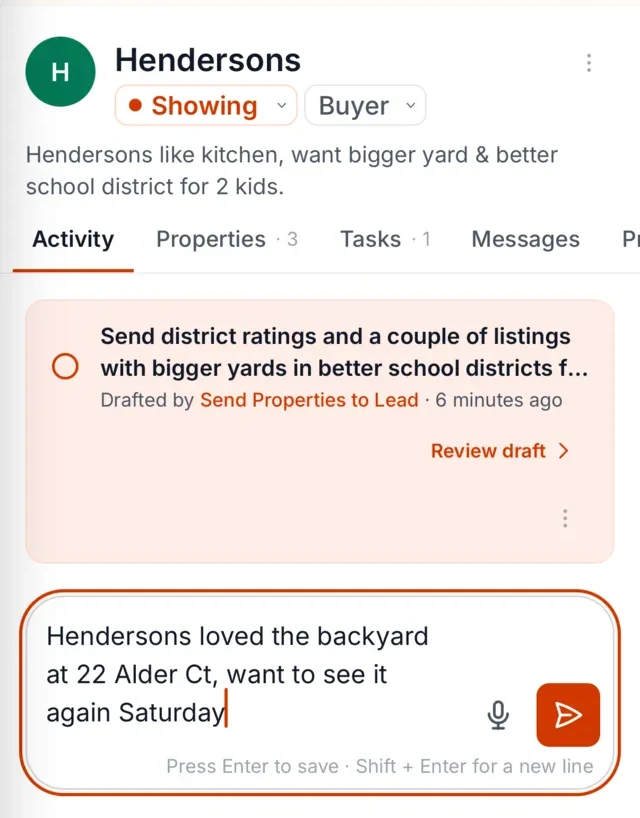
The Librarian files that against the right client (the showing, the preferences, the concern about the commute) and keeps it there. Nothing gets typed into a note app and forgotten.
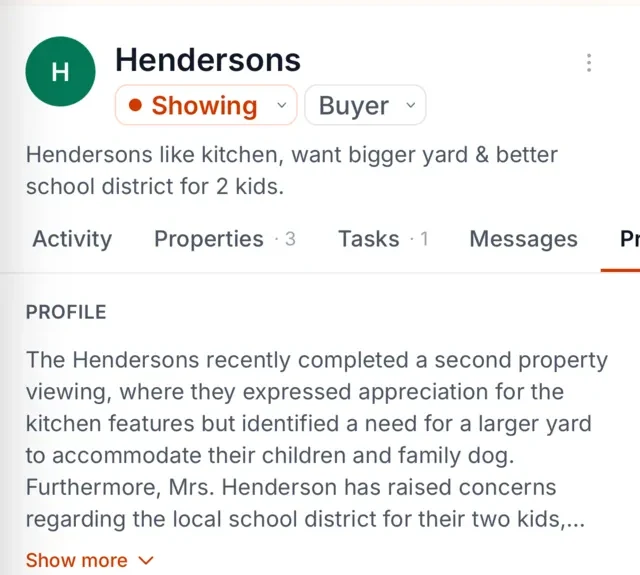
When it's time to follow up, you get a nudge, and the draft is already written using what you said. You read it, maybe tighten a sentence, and send.
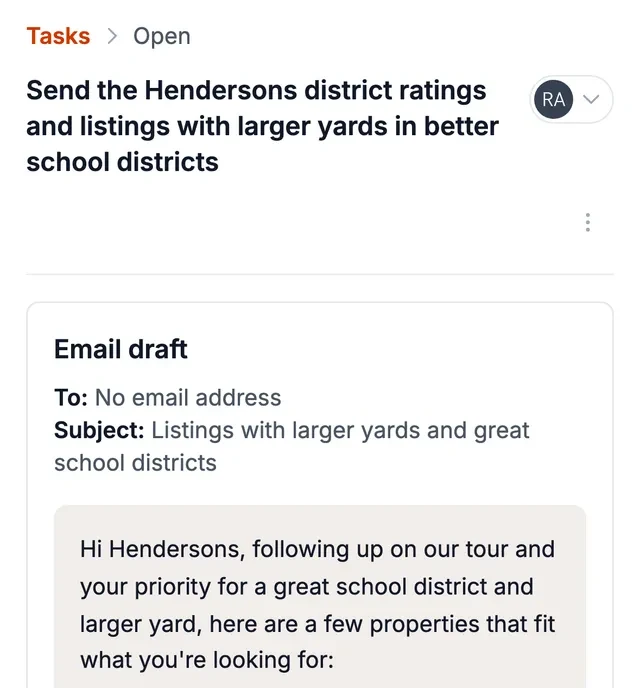
How The Librarian drafts these with that detail already filled in
Say what happened after the showing, and The Librarian attaches it to the right client: the preferences, the objections, the timing, the joke about the cul-de-sac. When the follow-up moment arrives, the reminder comes with a draft that already uses those details, in your voice, as an email or text for you to review and send. By default, you approve each message before it goes out. Like the templates above, it is written one-to-one, for a person you've actually talked to, not for a list.
Works alongside your tools
The Librarian works alongside your CRM, inbox and portals, so you keep working where you already do. It connects directly to BoldTrail CRM, Gmail, Google Calendar, Google Contacts, WhatsApp and SMS. For the nudge side of it, follow-up reminders for real estate agents covers how the timing is decided.
FAQ
How long should a follow-up text be?
One or two sentences, usually. A text that needs scrolling isn't a follow-up; it's a letter. Say who you are, reference one specific thing, and make the ask.
Email or text?
Text for speed and warmth, email for anything with substance: updates, multiple options, anything the reader might want to forward or save. Early in a relationship, whichever channel they used first.
How many times should I follow up?
Three to four touches over a few weeks is a reasonable pattern, with the last one giving them an easy out. After that, move them to a slower cadence. See past client follow up for real estate agents for the long-term version.
Can I send these in bulk?
They're not written for that. These templates are one-to-one: each is meant for a specific person after a specific conversation, and so are The Librarian's drafts. That's what makes a reply more likely.