The Librarian Remembers all the Important Details

CEO The Librarian
Experience AI memory that learns and remembers everything important about you. The Librarian's advanced memory feature stores personal details, preferences, and context, enabling smarter assistance that saves time and personalizes every interaction.
🧠 Examples of useful memories
You can save to AI memories all the important details that make your day-to-day tasks easier. Whether you’re managing your schedule or automating repetitive tasks, this productivity app ensures you stay organized and efficient.
Here are some examples of useful memories you can create and take advantage of:
- Home and office addresses to be added to physical meeting invites;
- Customized email distribution lists to be added automatically to emails;
- Default online meeting link (e.g., Zoom) to add to your calls calendar invites;
- Specific acronyms related to your work or industry;
- Email signature to add at the end of each email;
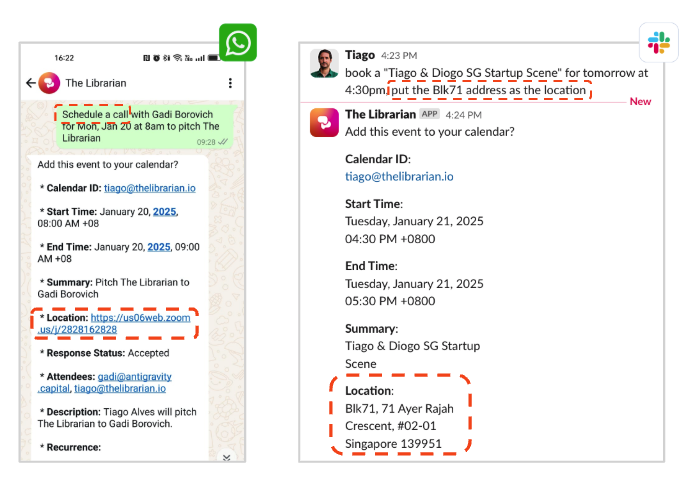
For example, in the below screensthos you can see how, when drafting the Caledar Invites, The Librarian automatically added the Zoom Link for the call and the Office Address for the face to face meeting:
📋 Step-by-Step Instructions (Adding Memories)
But how do these memories get added? Here are the three methods on how to add important facts and memories to The Librarian:
1️⃣ Manually via Account Settings
Go to Account Settings. Under the “Memories” section, enter the details you want The Librarian to remember (e.g., “My office address is 71 Ayer Rajah Crescent, #02-01 Singapore 139951”). Click Add, and you’re done!
2️⃣ By Telling The Librarian
Simply tell The Librarian to remember! For example, you can say, “Remember that this is the link for users to book a demo call with me - https://calendar.app.google/oyVG1SRcMDqZSunN7”, and it will store that information for future use.
3️⃣ Automatically Added by The Librarian
The Librarian has the intelligence to recognize relevant facts and automatically add them to your memories. For instance, an acronym (e.g., “SGT stands for Singapore Time”), a writing style preference (e.g., “prefer not to use the word 'thrilled' in professional emails”), etc.
🔐 You’re Always in Control
We understand that your data is personal, and you should always have control over it. At any time, you can go to your Account Settings to:
- View all your saved memories (manually and automatically created).
- Update any memory to reflect changes (e.g., a new address or meeting link).
- Delete any memory you no longer want The Librarian to store.
Try It Today!
What are you waiting for? Start taking advantage of this powerful AI memory today. The more The Librarian knows, the better it can assist you—saving you time and effort every day.
Let The Librarian boost your productivity, ensuring you never forget important details, so you can focus on what truly matters.