Follow-Up Automation, Check-ins and Recaps

CEO The Librarian
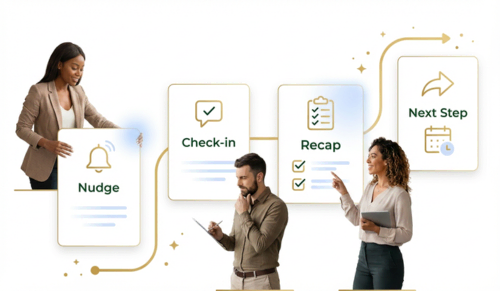
Automate follow-ups with AI while keeping them personal. The Librarian tracks quiet threads, sends timely recaps and check-ins in your voice, and helps you never miss a sales opportunity. Smart follow-up automation for busy professionals.
You already know follow-up is where momentum lives. It wins deals, moves projects forward, and reassures clients that you are on it. The hard part is doing it consistently when your day is packed. That is where The Librarian comes in. It acts as your Follow-Up Engine, turning intent into action by sending smart nudges, timely check-ins, and crisp recaps so nothing slips through the cracks. You keep the relationship and the judgment. The engine handles the cadence and the choreography. Think of it as a loop: Detect what matters, Decide the next move, Deliver the message that sounds like you.
Manual Follow-Ups VS Automated Follow-Ups
Most follow-up systems are built on memory, scattered notes, and best intentions. That works until schedules change, threads stretch across channels, and a dozen “I’ll circle back” promises pile up. A Follow-Up Engine fixes this by centralizing context and watching for meaningful signals. When it sees an unanswered email, a meeting that just ended, or a proposal that was viewed, it steps in with the next best move. You are no longer relying on what you remember at the end of a long day. You are relying on a system that notices, decides, and delivers. It runs the follow-up automatically, on time and in the right channel, so nudges go out without you lifting a finger. In practice, Detect, Decide, Deliver reduces missed moments by spotting the signal, choosing the action, and shipping it on time.
What a good Follow-Up Engine actually does
At its best, the engine feels like a thoughtful assistant who knows your style and respects your timelines. It references the last interaction so messages feel like a continuation, not a reset. It chooses the right channel for the job, and it keeps the tone human and helpful. After a call, it sends a clear recap with decisions, owners, and dates. For example, if you promise “I’ll send the revised proposal by Friday,” it drafts the updated email Thursday afternoon with the new PDF attached, schedules it for 9 AM Friday, and sets a reminder to check for a reply on Monday. When a thread goes quiet, it sends a gentle check-in that moves things forward without being pushy. And it logs everything in your system of record so you keep a clean audit trail. Behind each of these touches is the same pattern: Detect the trigger, Decide the right tone and channel, Deliver the follow-up that moves things forward.
Highlights at a glance:
- Context-aware nudges that adapt to the last touchpoint, urgency, and audience
- Human-sounding check-ins that keep conversations warm without adding noise
- Instant recaps after meetings with action items, owners, and links
- Channel intelligence across email, calendar, voice, and CRM
- Reliable cadence controls that enforce your SLAs and keep pipelines healthy. Each highlight maps cleanly to Detect, Decide, Deliver so your process stays simple and repeatable.
How it works behind the scenes
There is a simple loop running in the background: detect, decide, deliver. The engine connects to your calendar, email, and CRM, then detects signals like a completed meeting, a no-reply after two business days, or a document view. It decides what to do using your rules and the current context. Maybe that means a gentle nudge, a recap with next steps, or a scheduled reminder that lands right when someone is likely to respond. Finally, it delivers a message that sounds like you, includes the right links or attachments, and logs the outcome so reporting stays accurate and handoffs are smooth. The loop is straightforward, but the payoff is big because it converts intention into reliable action. Detect, Decide, Deliver keeps the system transparent, which makes it easy to audit and easy to improve.
Where automation helps most
Think about any workflow with multiple people and handoffs. In sales, automation shortens cycles by auto‑scheduling demos, drafting proposals from call notes, and triggering decision reminders on view or silence. In client services, it prevents surprises by auto‑sending status updates, renewal reminders, onboarding steps, and satisfaction check‑ins on fixed timelines. In recruiting and partnerships, it keeps loops moving by auto‑nudging interviewers for feedback, packaging scorecards, and routing approvals. For field work and appointments, it quietly auto‑handles confirmations, reschedules, and post‑visit summaries so logistics never block the relationship. The same Detect, Decide, Deliver loop applies across each function so teams share a common language and outcome.
Designing follow-ups that feel human
A good follow-up sounds like you on a good day, not a bot on a busy day. Reference context so the recipient does not have to reconstruct the story. Keep it short and specific so the next step is obvious. Offer an easy alternative if timing is off. Choose the channel that matches the task, using email when you need richer detail, quick messages when you just need a pulse check, and calendar invites when you are locking in commitments. As deadlines approach, you can tighten the cadence. When things are exploratory, you can give people more breathing room. The Librarian adapts to both without losing consistency. Detect the moment and the mood, Decide the tone and timing, Deliver a message that reads like you wrote it.
Quick design reminders:
- Lead with what changed or what was decided, then ask for one clear next step
- Keep tone warm and direct, not formal for the sake of it
- Make it easy to say yes, no, or propose another time
- Let context do the personalization instead of over-decorating the copy
- Log it all so you can learn and iterate
Signal triggers worth turning on first
If you want a fast lift without overhauling everything, start with a few high-leverage triggers. Because these triggers fire from real signals, not guesses, they recover the most lost time with the least setup, delivering quick wins and compounding ROI from day one. Send a post-meeting recap within 30 minutes that lists decisions, owners, and links. Follow up on no-reply emails at two business days, then again at five, and then pause unless the context changes. Flag deals or tasks that sit idle longer than your threshold so nothing lingers unnoticed. Tie proposal and document events to timely check-ins. For appointments, confirm 24 hours before, remind two hours prior, and send a short summary afterward. These few defaults cover most momentum leaks and build trust quickly.
Revenue, retention and time saved matters
You will know the engine is working when you see movement, not just messages. Track the reply rate to nudges within 48 hours, watch the cycle time from first touch to decision, and check coverage by verifying that meetings get recaps with clear action items. Monitor the percentage of assigned tasks that are completed on time. Most importantly, look at revenue impact by noting deals advanced or saved by timely follow-ups. These metrics tell you whether the system is creating signal or just adding noise, and they guide your tweaks to copy, timing, and segmentation. Measure each stage of Detect, Decide, Deliver so you can see where outcomes improve and where to tune.
Common pitfalls to avoid
Over-automation is the easy mistake. If cadence is too tight or copy feels generic, people tune out. Keep context front and center, vary the language, and stagger messages so communication feels considerate. Another common issue is having multiple sources of truth for contacts, stages, or ownership. Pick one system to be authoritative and let the engine keep it updated. Avoid vague asks. Every follow-up should point to a decision, a date, or a next step. And always keep an audit trail. When you can see what was sent and why, you can coach the system and continuously improve. The Librarian mitigates these risks by tailoring cadence to live context, writing in your voice, syncing to a single source of truth, and recording every action with reasons.
Implementation playbook
Start simple, then expand with evidence. In week one, identify your top follow-up moments and write the messages you would send by hand. This gives the engine the voice you want. In week two, connect calendar, email, and CRM, then enable meeting recaps and two-day no-reply nudges to cover the biggest gaps. In week three, add proposal, document, and appointment triggers so the engine can react to real activity. In week four, review your metrics, tighten your copy, and tune cadences by segment or stage so different audiences get the rhythm that fits them. Use Detect, Decide, Deliver as the blueprint for each week’s rollout so complexity stays manageable.
The best follow-up is the one that actually happens. With The Librarian acting as your automated Follow-Up Engine, nudges, check-ins, and recaps run quietly in the background, conversations keep moving, clients feel looked after, and your team stays in sync. You focus on the relationship and the decision. The engine keeps the drumbeat so nothing slips.